Contact
Free Chrome extension01 / 02

Video DownloaderWizard

Finds the videos and audio files on the page you have open and saves them to your computer.

What it does

Segmented streams, saved as one ordinary MP4. Downloaded piece by piece and joined inside your browser, with no external server and no extra program.
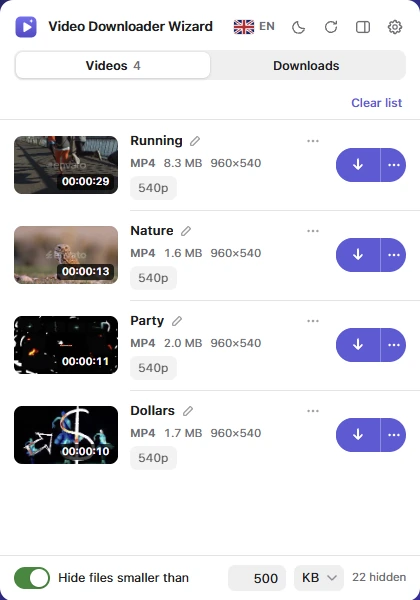
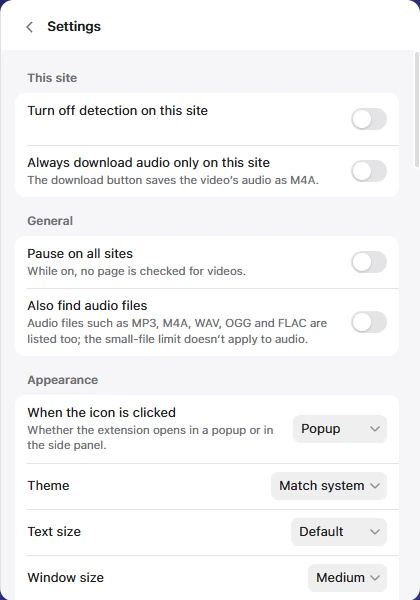
The extension window listing four videos found on a page, each with its format, size, resolution and a download button. The settings screen: turn off detection on this site, pause on all sites, also find audio files, theme, text size and window size.
Features

Everything in the box

Direct files, segmented streams, audio, subtitles and live broadcasts, handled by one small window.

Streams, joined into one file

HLS (m3u8) and DASH (mpd) streams are downloaded in segments and merged into a single MP4.

Pick the quality

From 360p up to 4K, whenever the stream offers a choice.

Audio only

Save just the sound as M4A, MP3, WAV, AAC, OGG or WMA.

Subtitles and audio languages

Download subtitles as SRT or WebVTT, and choose the audio language when a stream carries more than one.

Live broadcasts

Record a live stream while it plays.

Queue and history

Several downloads at once, a queue for the rest and a history of what you saved.

Also included

The smaller things

  • Direct filesFinds MP4, WebM, MOV and similar video files on the page.
  • ConvertOutput as MKV, MOV, AVI, WMV or WebM.
  • Audio filesOptionally lists MP3, M4A, WAV, OGG and FLAC files too.
  • File namesA file name template and a subfolder of your choice.
  • Per-site controlTurn detection off on any site.
  • ShortcutsKeyboard shortcuts and a right-click menu.
  • InterfacePopup or side panel, light or dark theme, 50 languages.
How it works

Four steps, one window

From opening a page to having the file on your computer.

1Find

Open a page

The extension looks for video and audio on the page you have open and lists what it finds, with quality, size and length.

2Choose

Pick what you want

A quality, an audio language, subtitles, or only the sound.

3Download

It downloads and joins

Stream segments are fetched and merged into one MP4 inside your browser.

4Keep

It's on your computer

The file lands in your downloads. The history lets you play it or show it in its folder.

Privacy

What's yours stays yours

The whole process runs in your browser.

Read the privacy policy
  • No accountThere is nothing to sign up for.
  • No analytics or trackingThe extension contains no analytics or tracking code.
  • Stored on your computerSettings and download history are kept only on your device.
  • Nothing sent to usThe extension sends no data to the developer.
Limits

Good to know

What the extension does not do, and what stays your responsibility.

All questions and answers
Does it work on YouTube?
No. Chrome Web Store rules do not allow extensions to download YouTube videos, so YouTube is not supported.
Can it download from Netflix, Disney+ and similar services?
No. DRM-protected content cannot be downloaded.
What am I allowed to download?
Only content you have the right to download. Respecting copyright and each site's terms of use is your responsibility.
Do I need another program or an account?
No. Everything happens inside your browser. No external server, extra program or account is needed.
Where is my download history kept?
Only on your computer. The privacy policy lists exactly what is stored and for how long.

Add it to Chrome

It is free and needs no account. Open a page with a video on it and click the icon.

Add to Chrome
Next pageTheme Detector